Webflow QA Tool for Developers & Agencies

Your Client Shouldn't Be the One Finding Issues.

Run a full audit before every handoff – and ship clean sites every time.

Get started for free
Free forever · No credit card

Sound familiar?

Blond person with short hair using a silver laptop with an apple logo.

Spending hours on manual QA before every launch

Yellow face emoji with clenched teeth and wide eyes expressing nervousness or awkwardness.

Missed a bug that your client found after handoff

Classic stopwatch showing 14.3 seconds with the second hand near 0 and the minute hand on 14 seconds.

Losing billable time because QA slows every project down

Gray office building with multiple windows and two entrance doors.

Struggling to keep QA consistent across your whole team

Magnifying glass with a silver rim and black handle.

Using PageSpeed Insights but getting no Webflow-specific fixes

Stack of three hardcover books in green, red, and blue colors.

Paying developers to do work a tool should handle

If this sounds familiar – Speedflow was built for Webflow professionals like you.

One click replaces hours of manual QA

Without Speedflow

Jumping between 4-5 tools for every audit
Spending 2–6 hours on QA before every launch
Missing issues your client finds after handoff
No alerts when something breaks after launch
No repeatable QA process from project to project

With Speedflow

Every page checked in one scan
Full results in under 2 minutes
Clear report before anything goes live
Automatic monitoring every week
Same QA process, every project, every time

Everything your QA process needs, in one tool

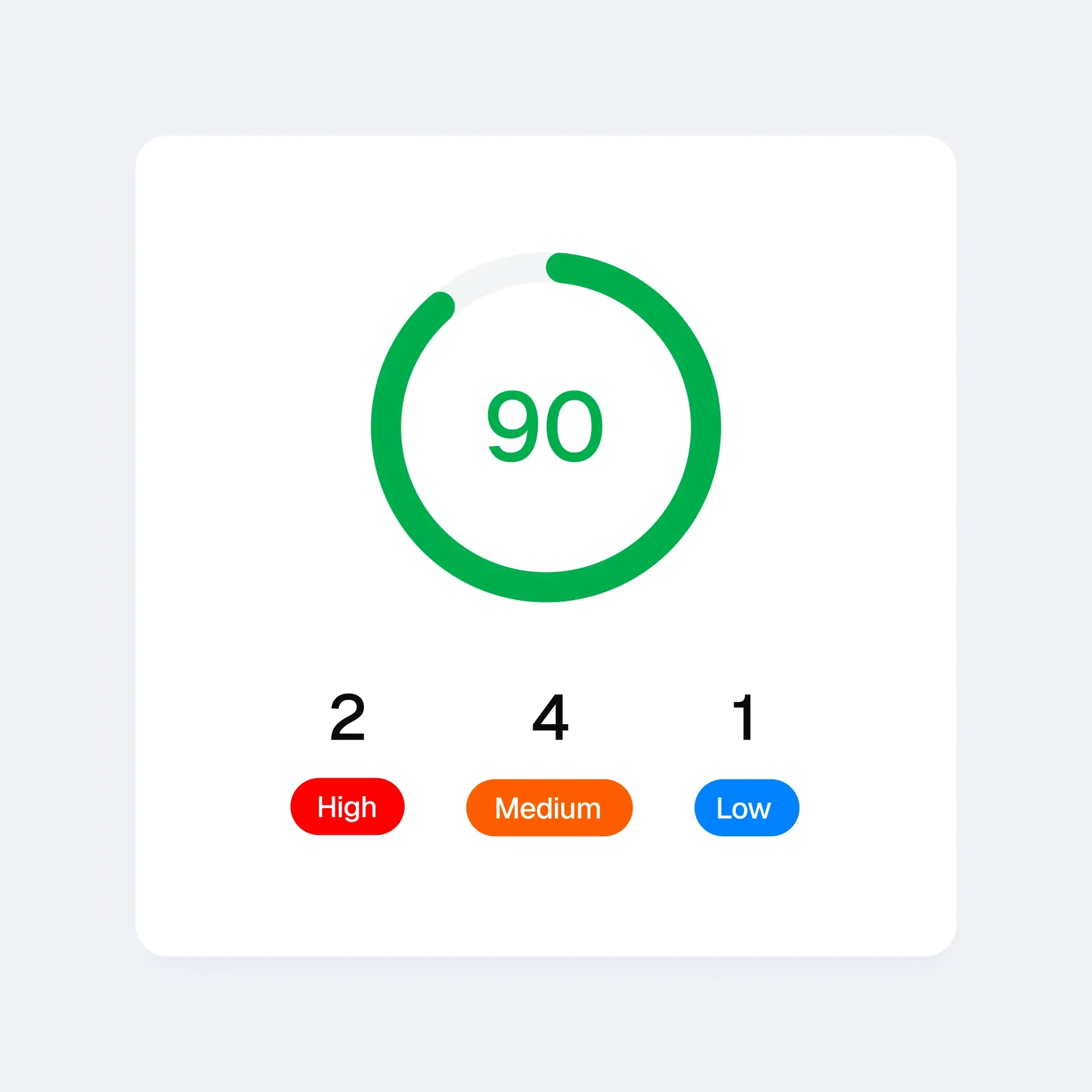
Speedflow score system

Every page. Every check. Nothing skipped.

Paste a URL. Get a complete picture of your site's health – accessibility, SEO, and performance – before your client opens it.

No setup or integrations
Results in under 10 seconds
Works on published and staging URLs
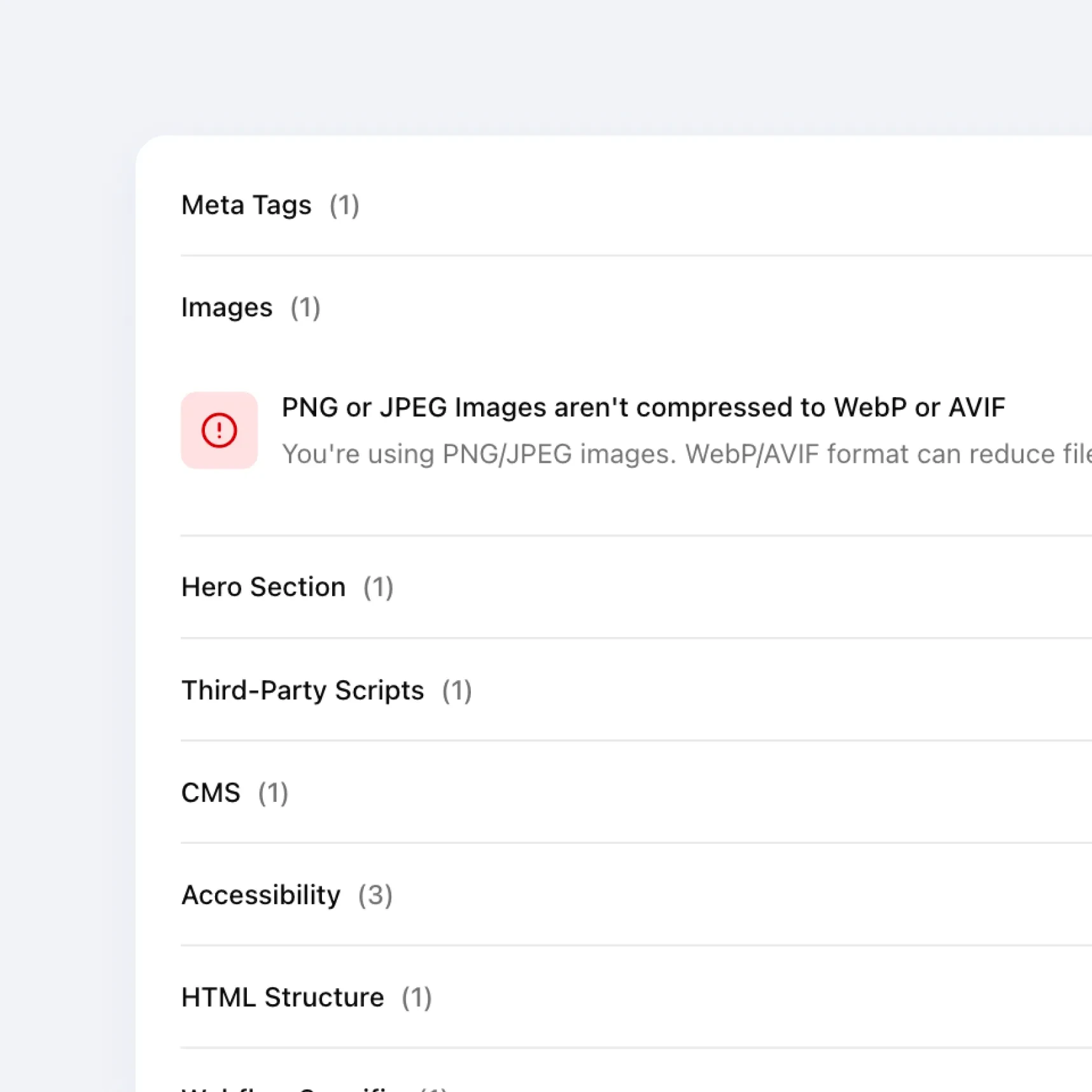
Speedflow issues list

Every issue explained in plain language

Not a score. Not a cryptic metric. Each issue tells you what's wrong, why it matters, and how it affects the site.

Accessibility compliance checks
Font and script analysis
Meta tags and SEO checks
Webflow-specific issue detection
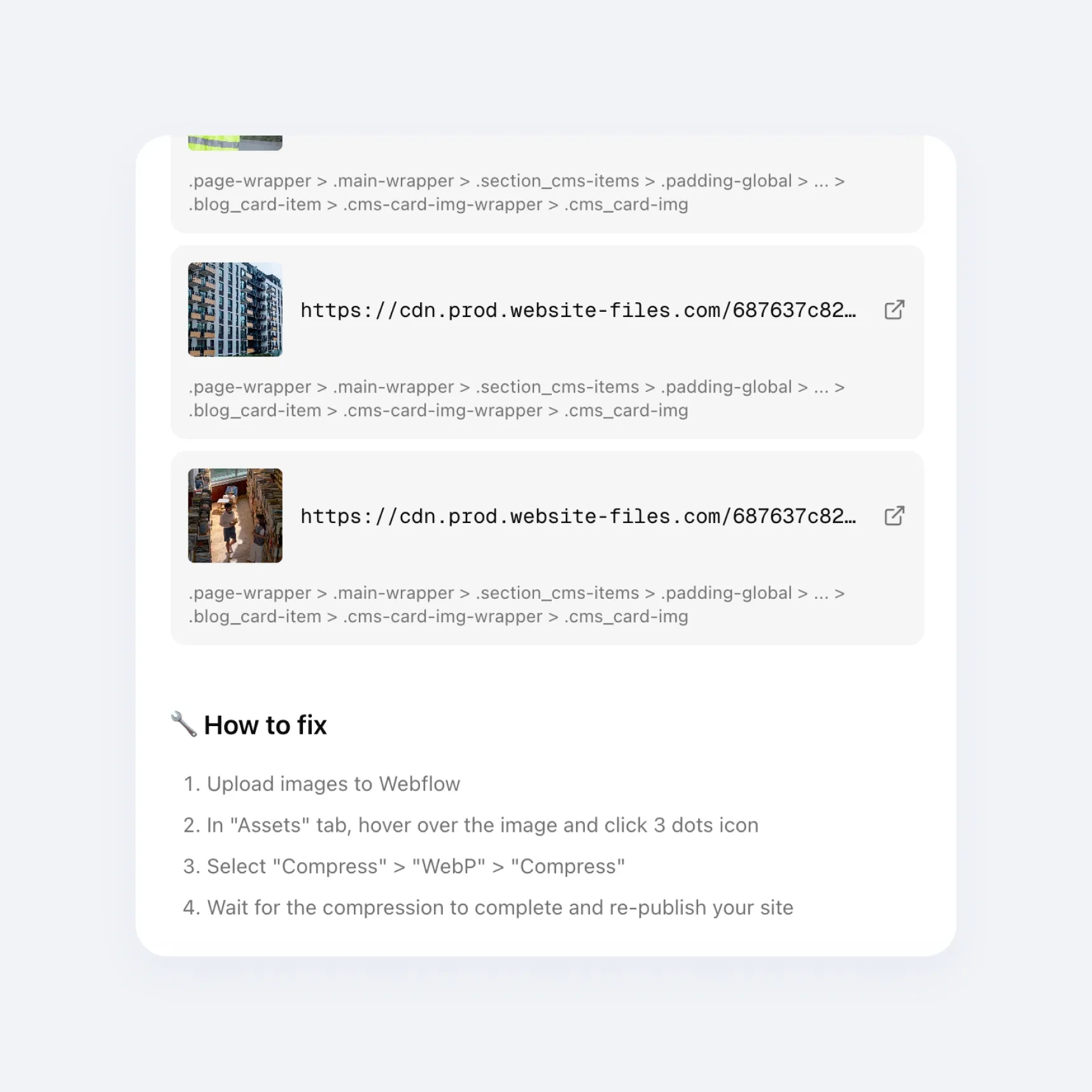
Speedflow "How to fix" block

Fixes written for Webflow

Every recommendation includes exact steps inside the Designer. No Googling. No guessing.

AI-powered fix suggestions
Webflow-specific solutions only
Step-by-step panel-by-panel instructions
Beginner-friendly language

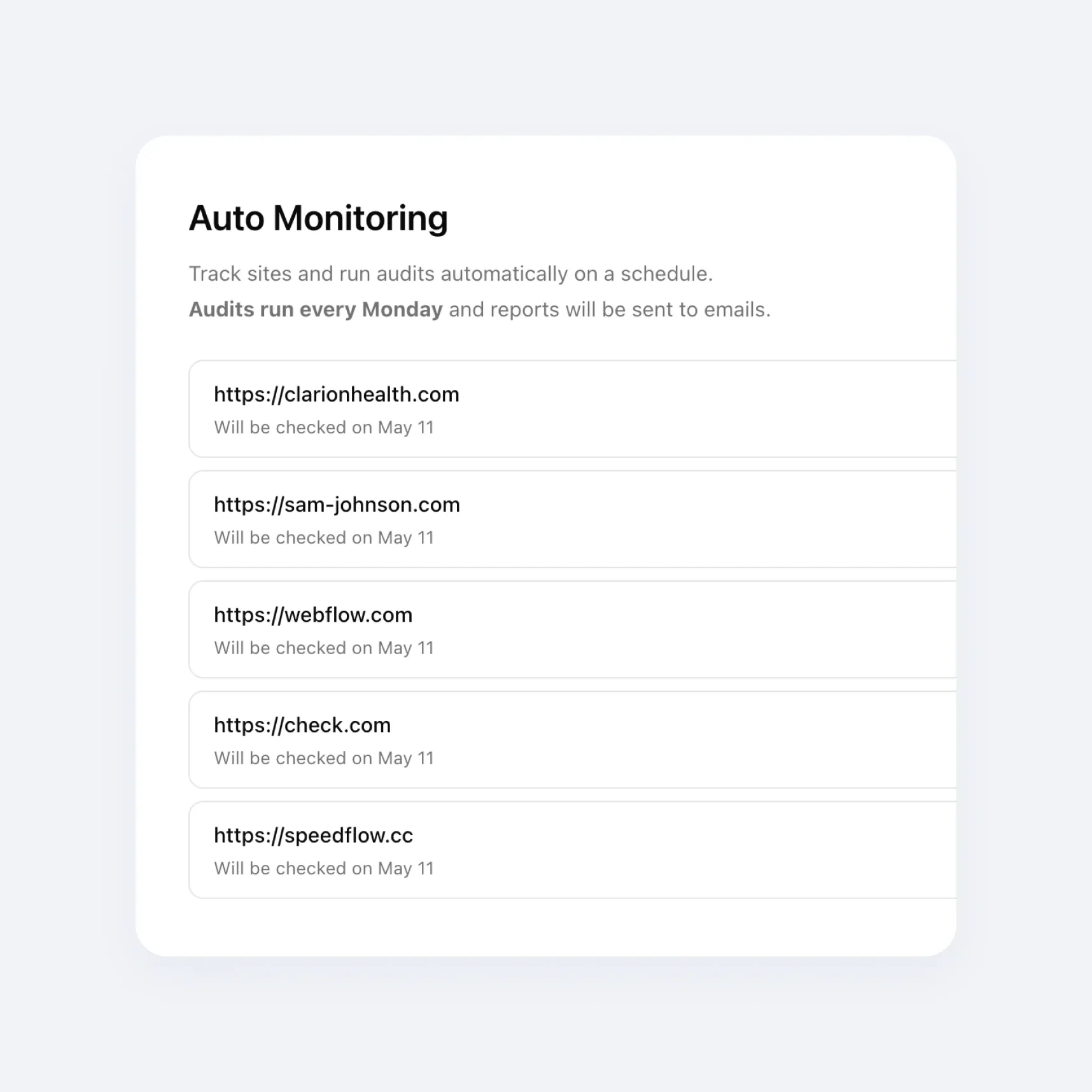
Always know when something breaks

Speedflow re-checks your site automatically every week.

Automatic checks every week
Full history of every monitoring run
Works across your entire site

Three steps, zero setup

01

Paste Your URL

Any Webflow page – published or staging.

02

Get a full audit in seconds

50+ QA checks: accessibility, SEO, and performance. Prioritized by impact.

03

Fix with confidence

Follow Designer-specific instructions and launch knowing the site is clean.

What Webflow developers say after testing Speedflow

Real feedback from Webflow developers and agencies using Speedflow.

Finally, the tool that deserves the spotlight among Webflow developers. It's soo effective that we've instantly incorporated it into our QA process. An incredible time and nerve saver!

Stefan Keglić
Stefan Keglić
the kreative duo, co-founder

There's always that moment when a client opens the site on their end and starts poking around. I used to dread it. Since I started using Speedflow before every launch, I actually look forward to that moment – because I know the site is clean.

Sophie R.
Sophie R.
Webflow Developer

I used to spend 1-2 hours going through each site manually before launch. With Speedflow I get the same result in under a minute. That time adds up fast when you're managing multiple client projects at once.

Tomas K.
Tomas K.
Webflow Developer

QA used to be held together by memory and manual checklists.

Speedflow changed that – I run it at the 80-90% mark on every project, paste the URL, work through the fixes, done. Hours became minutes. One sitemap crawl covers the whole site, and fixes come with your actual data pre-filled and clear step-by-step instructions.

Whenever I flag something, Dmytro has it sorted the same day. That kind of support is rare.

If you're doing Webflow work and you're not using Speedflow, you're making QA harder than it needs to be.

Maurice Röhler - Freelance Strategic Web Designer
Maurice Röhler
Freelance Strategic Web Designer

Before sending a site live, I always had that uncomfortable feeling – "did I miss something?"

Speedflow killed that anxiety. I run an audit, fix what it flags, and launch knowing the site is clean. My clients haven't come back with quality complaints since.

Tim S.
Tim S.
Freelance Webflow Developer

QA always felt overwhelming – I knew something was probably off, but I didn't know where to start or what actually mattered. When I tried Speedflow, everything clicked.

The app doesn't just give you a score, it pinpoints the exact element causing the issue, explains why it matters, and guides you on how to fix it. That's how I finally started taking accessibility and other checks seriously, things I had never even considered before. Now auditing a site feels like a clear, manageable process instead of a frustrating guessing game.

Alina Zinchenko
Alina Zinchenko
Webflow Developer

I run a small Webflow agency and QA was always the bottleneck before launch. We'd manually go through checklists, run, check accessibility – it took hours. Speedflow replaced most of that in one click.

Klim
Klim
CEO & Founder of an Agency

Simple pricing for any Webflow workflow

Start free. Upgrade when you're ready to scale.

Starter

Try Speedflow on your own projects
$0

Free forever

Get started for free
Unlimited analyzes
10 static / 20 CMS page audit
Last 5 audits history
Affected elements preview
AI-powered suggestions
Auto-monitoring
Team members
Priority support

Agency

Full QA coverage for bigger teams

$49

Per month, billed monthly

Start free trial
Unlimited analyzes
50 static / 100 CMS page audit
Full audits history
Full affected elements
AI-powered suggestions
Auto-monitoring
Unlimited team members
Priority support

Starter

Try Speedflow on your own projects
$0

Free forever

Get started for free
Unlimited analyzes
10 static / 20 CMS page audit
Last 5 audits history
Affected elements preview
AI-powered suggestions
Auto-monitoring
Team members
Priority support

Agency

Full QA coverage for bigger teams

$36

Per month, billed annually at $439

Start free trial
Unlimited analyzes
50 static / 100 CMS page audit
Full audits history
Full affected elements
AI-powered suggestions
Auto-monitoring
Unlimited team members
Priority support

Still not sure that Speedflow is the right tool for you?

Let AI do the thinking for you. Choose a button and see what your favorite AI says about Speedflow.

Don't let your client find the issues first.

Run a full audit before every launch – free, in under 10 seconds.

Analyze your site free